
As AI-powered search becomes a dominant force in how people discover products and services, advertisers need to adapt. OpenAI has introduced a sponsored listings feature within ChatGPT, giving businesses a powerful new channel to reach millions of users actively seeking recommendations. If you want to capture AI-driven traffic before your competitors do, this guide walks you through everything you need to know.
What Are ChatGPT Ads?
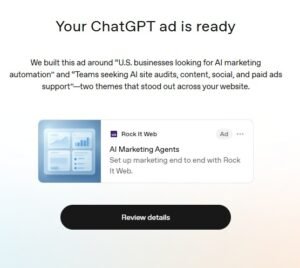 ChatGPT ads are sponsored placements that appear within ChatGPT’s conversational responses. When a user asks for a product recommendation, service suggestion, or solution to a problem, your business can appear as a featured result alongside organic answers. Think of it as SEO — but for AI conversations. These ads are contextually matched to user intent, making them highly relevant and less intrusive than traditional display advertising.
Step 1: Set Up Your OpenAI Advertiser Account
Before launching any campaign, you need access to OpenAI’s advertising platform.
- Visit ads.openai.com and sign up for an advertiser account.
- Verify your business information, including your website URL and business category.
- Add your payment method and set a billing threshold.
- Review and accept OpenAI’s advertising policies — pay close attention to restricted categories such as financial advice, health claims, and political content.
Pro Tip: Use a business email domain rather than a personal Gmail address. It speeds up verification and builds credibility with the platform.
Step 2: Define Your Campaign Objective
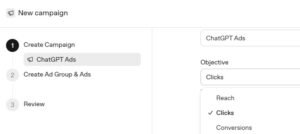 Like any strong advertising strategy, your ChatGPT campaign starts with a clear goal. The platform currently supports several objective types:
- Reach — Get your name in front of users early in their decision journey
- Clicks — Drive users directly to a landing page or product page
- Conversions — Target users with high purchase intent
Select the objective that aligns with your funnel stage. For most small businesses, Clicks or Conversions offers the fastest, most measurable return.
Step 3: Build Your Target Audience
ChatGPT’s advertising system uses contextual signals rather than cookie-based tracking, which means your targeting is built around topics, intents, and conversation categories rather than demographics alone.
- Topic Targeting: Choose the subject areas where you want your ad to appear (e.g., “home renovation,” “SaaS tools,” “fitness supplements”)
- Intent Signals: Select whether to target users in research mode, comparison mode, or purchase-ready mode
- Geography: Narrow your reach to specific countries, regions, or cities
- Device Type: Choose between mobile, desktop, or both
Layering topic targeting with intent signals is the most effective combination for maximizing conversion rates.
Step 4: Write Your Ad Copy
This is where ChatGPT advertising differs most from traditional paid search. Your copy must feel conversational and helpful, not salesy. Because it appears within a chat interface, aggressive or overly promotional language will feel jarring and reduce click-through rates.
Follow this proven structure:
- Headline (up to 60 characters): Lead with a benefit, not a feature. Example: “Find the Right Accounting Software in Minutes”
- Description (up to 150 characters): Provide context and a clear value proposition. Example: “Trusted by 10,000+ small businesses. Try free for 30 days — no credit card needed.”
- Call to Action: Use action-oriented language like “Explore Now,” “Get Started,” or “See Pricing.”
Avoid superlatives like “best” or “cheapest” without substantiation. OpenAI’s review team flags unverified claims during the approval process.
Step 5: Set Your Budget and Bidding Strategy
ChatGPT ads operate on a cost-per-click (CPC) model, with options for manual or automated bidding.
- Daily Budget: Start conservatively — $20 to $50 per day is sufficient for initial testing
- Manual CPC: Gives you full control over maximum bid per click
- Automated Bidding: Lets the platform optimize bids for your chosen objective, recommended once you have conversion data
Monitor your cost-per-click benchmarks during the first two weeks before scaling spend.
Step 6: Launch, Monitor, and Optimize
Once your campaign is live, consistent monitoring is essential.
- Check click-through rate (CTR) daily for the first week
- Review conversion rate weekly to assess landing page performance
- A/B test at least two ad variations simultaneously
- Pause underperforming ad sets after 7–10 days of meaningful data
- Gradually increase budget on campaigns that exceed your target CPA
Conclusion
ChatGPT ads represent one of the most exciting emerging opportunities in digital marketing. With user intent baked into every conversation, your ads reach people precisely when they are ready to act. By following these steps — from account setup through ongoing optimization — you position your business at the forefront of AI-driven discovery before the channel becomes saturated. Start small, test deliberately, and scale what works.
Frequently Asked Questions
Q: Are ChatGPT ads available to all businesses globally?
Q: How do ChatGPT ads differ from Google Ads?
Q: What industries perform best with ChatGPT advertising?
Q: How long does ad approval take?
Q: Is there a minimum budget requirement?