

Most Google Ads accounts aren’t broken — they’re just leaving conversions on the table. Small, strategic adjustments can compound quickly, and for many advertisers, closing a 25% gap in lead volume doesn’t require a bigger budget. It requires smarter execution. Here are ten proven tweaks you can implement today.
1. Switch from Broad Match to Broad Match with Smart Bidding
Broad match alone can drain budgets on irrelevant queries. But when paired with Target CPA or Target ROAS smart bidding, Google’s algorithm uses conversion signals to filter traffic intelligently. Advertisers who make this pairing often see a 15–20% improvement in qualified lead volume within 30 days.
Action step: Audit your current match types. For any broad match keywords running on manual CPC, transition to a smart bidding strategy and monitor search term reports weekly for the first two weeks.
2. Add Negative Keywords Aggressively
The challenge with Facebook ads is filtering out junk leads through targeted audience creation, but Google has the opposite challenge at the outset – spends without generating any leads. One of the fastest ways to improve lead quality — and volume — is eliminating this wasted spend. Every dollar saved on irrelevant clicks is a dollar you can reinvest in converting traffic.
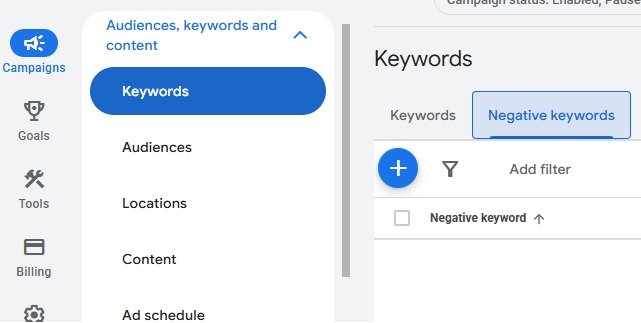
Action step: Pull your search terms report for the past 90 days. Flag any queries with zero conversions and high spend. Build a negative keyword list organized by campaign theme, and schedule monthly reviews to keep it updated.
3. Tighten Your Ad Scheduling
Running ads around the clock sounds comprehensive, but it often means your budget is depleted before peak conversion hours arrive.
Action step: Segment your conversion data by hour of day and day of week inside Google Ads reports. Reduce bids or pause ads during consistently low-converting windows. One SaaS company reallocated 22% of their budget to peak hours and saw inbound demo requests increase by 30% in six weeks.
4. Use Responsive Search Ads with Pinned Headlines
Responsive Search Ads (RSAs) give Google flexibility, but too much flexibility can dilute your core message. Pinning your strongest value proposition to Headline 1 ensures it always appears — while still allowing the algorithm to optimize the remaining combinations.
Action step: Identify your top-performing headline from historical ads. Pin it to position 1. Let positions 2 and 3 rotate to surface secondary strengths like social proof, urgency, or key differentiators.
5. Improve Landing Page Relevance Score
A high click-through rate means nothing if your landing page doesn’t convert. Google rewards ad-to-page relevance with better Quality Scores, which lowers your cost per click and improves ad position — both feeding more leads at lower cost.
Action step: Ensure your landing page headline mirrors the language in your ad. Use dynamic text replacement tools like Unbounce or Google’s ValueTrack parameters to align messaging automatically across multiple ad groups.
6. Enable All Relevant Ad Extensions (Now Called Assets)
Ads with extensions have significantly higher CTRs. Sitelinks, callouts, lead forms, and structured snippets give your ad more real estate and provide users with multiple paths to engage.
Action step: Audit which assets are currently active. If you’re missing lead form extensions, structured snippets, or call extensions, add them immediately. Accounts that activate lead form assets on mobile often see a 20%+ lift in top-of-funnel lead volume.
7. Optimize for Micro-Conversions
If your campaign optimizes only for final form submissions, you’re giving Google’s algorithm too little data to learn efficiently — especially in low-volume niches.
Action step: Set up micro-conversion tracking for actions like time on page (over 90 seconds), pricing page visits, or video views. Import these as secondary conversion goals. This feeds the algorithm richer signals and accelerates smart bidding performance.
8. Implement Audience Layering
Google Ads lets you layer audiences on top of keyword targeting without restricting reach. Adding in-market audiences, customer match lists, or remarketing segments as “observation” settings lets you bid up for high-intent users while still reaching new prospects.
Action step: Apply your CRM customer list as a customer match audience. Set a +20–30% bid adjustment for users who resemble your best converters. Monitor conversion rates by audience segment over 30 days.
9. Run a Dedicated Competitor Keyword Campaign
Bidding on competitor brand terms captures users who are already in active buying mode. These leads convert faster and often have a lower sales cycle.
Action step: Create a separate campaign targeting competitor brand names. Write ads that highlight your differentiation — not your competitor’s weaknesses. Keep landing pages focused on direct comparison or a compelling switch offer like a free trial or migration support.
10. Test a Lower-Friction Offer in Your CTA
Sometimes the bottleneck isn’t the ad — it’s the ask. If your CTA leads with “Request a Demo” or “Contact Sales,” many users aren’t ready to commit. Introducing a mid-funnel offer can dramatically increase lead volume.
Action step: A/B test your current offer against a lower-friction alternative: a free audit, a checklist download, or a short assessment. One B2B technology firm tested a “Free Competitive Analysis” CTA against “Book a Demo” and captured 40% more leads, with only a 12% drop in downstream close rate.
Start with Two, Scale to Ten
You don’t need to implement all ten tweaks simultaneously. Prioritize the changes with the highest potential impact for your specific account: typically negative keyword expansion, ad scheduling, and landing page alignment deliver the fastest results. Once those are optimized, layer in audience targeting and offer testing.
A 25% increase in leads isn’t a moonshot — it’s the result of deliberate, systematic improvements applied consistently over time. The budget is already there. These tweaks make sure it works harder.